| Title | Anchor ID | Element Type |
|---|
 |
Inventory and Cost of Goods SoldCost of Goods Sold is automatically posted by SMARTEDGE if enabled in Company Preferences. To enable this go to . Enable the tickbox for Continuous Inventory Please note that items and accounts relating to assembly is only available in edition ES3 Assembly.  Terminology Please note that when the term Cost Of Sales is used it is not referring to a particular account. Cost of Sales is a group of several accounts that make up the net or total cost of sales in your income statement. For example, the accounts Changes In Inventory, Purchases and Cost of Goods Sold are all Cost of Sales accounts. What is Continuous InventoryContinuous Inventory ensures that any movements in stock are automatically reflected in the Inventory accounts of the financial books. In other words, when stock movements occur the movement is posted on the Changes In Inventory and Inventory accounts. When Should Continuous Inventory be EnabledContinuous should be enabled if you have the following requirements:
With continuous inventory the number of inventory change transactions can become very high and make it harder to find particular changes. 
When enabling continuous inventory it is important that cost prices and stock levels are meticulously kept. If stock is not tracked properly with the correct prices, continuous inventory may cause more confusion than information. When Continuous Inventory is Not NecessaryIf you do not require that inventory and cost of sales is continuously updated you may find it easier to disable continuous inventory and rather at monthly intervals reconcile inventory with stock movements. This can be done in menu . This menu option displays the total value of stock and the current value posted in Inventory. From these values you can capture the monthly cost of sales, becuase it should be equal to the difference between the inventory value and the stock value. An important advantage of not using continuous inventory is that it reduces the number of inventory change transactions significantly and makes it easier to view the inventory accounts. Enabling Continuous InventoryIf Continuous Inventory is enabled purchases captured from purchase orders can either be accrued or expensed when the purchase order is received (costed and stocked). The important advantage of accruing purchases is that it ensures that cost of sales is periodically correct even if the received date of the stock is in a different month than the date of the supplier invoice. Purchases AccrualAccruing Purchases means that purchase orders do not cause transactions to be posted on cost of sales accounts when goods are being received (costed and stocked). Instead the purchase is posted to an accrual account, which is a short-term liability. The supplier invoice is subsequently posted against the accrual account instead of the purchases (cost of sales) account. In effect the supplier invoice will move the short-term liability from Accruals to Accounts Payable (suppliers) To set the Purchases Accrual method, go to . Select the option for Purchase Accrual In SMARTEDGE there are three options for accrual or not:
For both accrual options, supplier invoices are suggested to be posted against the Purchases Accrual account instead of the Purchases account.
SMARTEDGE recommends that one of the Accrual options are used if you have enabled Continuous Inventory. If you are not familiar with the concept of Changes In Inventory and the fact that Net Cost of Sales in a period is equal to total purchases less changes in inventory it is strongly recommended that Direct Accrual is used. Direct Accrual offers the easiest interpretation of cost of sales, because purchase orders does not affect any cost of sales accounts, only the inventory and accrual accounts. Using Direct Accrual, cost of sales is only affected when stock is sold and invoiced to a customer. Accounts Used for Continuous InventoryAssets and ValuesInventoryThis is the account that tracks inventory. Stock Items, Assembled Items and Raw Materials has a selection for an inventory account. This is usually the same account for all items, but can be different. This account does not have to be named Inventory, but it has to belong to the account group Inventory. The Inventory Account setting on the item can be overridden by the Inventory Account setting on the Warehouse. Click here to read more about account settings on items, or click here to read more about account settings on warehouses. Capitalised Assembly ServicesThis is the account that tracks services purchased for assembly purposes. Only Input Services has a selection for the Capitalised Assembly Services account. This is usually the same account for all input services, but can be different. This account has to belong to the account group Inventory. Capitalised Assembly Services works similar to the Inventory account. When a purchase is made for an input service on the service is capitalised. When this service is utilised on a assembly order, the capitalised service is reduced and expensed on the Assembly Services Usage account. The Capitalised Assembly Services Account setting on the item can be overridden by the Inventory Account setting on the Warehouse. Click here to read more about account settings on items, or click here to read more about account settings on warehouses. Materials in ProductionThis account is used on Assembly orders, to track materials that are being used in producing items, where the assembly of the item is not yet finished. Services in ProductionThis account is used on Assembly orders, to track input services that are being used in producing items, where the assembly of the item is not yet finished. Expense AccountsCost of Goods Sold / Changes In InventoryThis account is used differently depending on the Accrual method. If Direct Accrual is used, this account should be the Cost of Goods Sold account. It will not be used on Purchase Orders, only on Invoices. This is because Purchase Orders will only use the Purchases Accrual account when receiving stock. If Accrual w/Changes In Inventory or No Accrual is used, this account tracks the movements of inventory. It is a cost of sales account and offset any posting on the purchases account. Each item has a selection for a Changes In Inventory account. This is usually the same account for all items, but can be different. This account does not have to be named Changes In Inventory, but it has to belong to the account group Cost Of Sales. This setting on the item can be overridden by the setting on the Warehouse. Click here to read more about account settings on items, or click here to read more about account settings on warehouses. PurchasesThis is the account that tracks the purchase from supplier invoices. It is a cost of sales account. For Stock Items, the Purchases account is only used for Accrual w/Changes in Inventory or No COGS Accrual. When Direct Accrual is used, the purchases account is not used for Stock Items. Each item has a selection for a Purchases account. This is usually the same account for all items, but can be different. This account does not have to be named Purchases, but it has to belong to the account group Cost Of Sales. This setting on the item can be overridden by the setting on the Warehouse.Click here to read more about account settings on items, or click here to read more about account settings on warehouses. Accruals and LiabilitiesPurchases AccrualThis account is used differently depending on the Accrual method. If No Accrual is used, this account will not be used by the system. If Accrual is used, this account should be the Purchases Accrual account, which must be a short-term liabilitity. When a purchase order is received (costed and stocked) this account will be used to track the accrued purchase value. The supplier invoice will also be captured against this account Stock Items, Raw Materialsl has a selection for a Purchases Accrual account. This is usually the same account for all items, but can be different. This account does not have to be named Purchases Accrual, but it has to belong to the account group Accruals. This setting on the item can be overridden by the setting on the Warehouse. Click here to read more about account settings on items, or click here to read more about account settings on warehouses. Purchases and InventoryNot Using Purchase OrdersIf you are not using Purchase Orders, Supplier Invoices for goods to be resold should be captured directly on the Inventory Account, instead of on the Purchases Account. This would be similar to the inventory posting when the Direct Accrual method is used for purchase orders. How Purchase Orders Affect InventoryPlease note that the financial books updates only applies when Continuous Inventory is enabled. Stock movement is captured on the Received Date of the PO. The following happens with stock and inventory for a Purchase Order:
For Purchase Returns, stock is reduced and the transactions are reversed from the listing about (in other words Inventory is Credited instead of Debited) How a Supplier Invoice Should be CapturedNo AccrualWhen capturing the supplier invoice for goods that have been received through a Purchase Order, the expense account should be the Purchases Account for the item. This is to ensure that Cost of Sales are correctly calculated. COGS AccrualWhen capturing the supplier invoice for goods that have been received through a Purchase Order, the COGS Accrual account should be the account for the item. This is to ensure that the Accrual (short-term liability) is balanced, and that net COGS are posted when invoicing takes place. Example of a Purchase Order and InventoryAssume you received 10 units of item A at 500.00 each. Please note that VAT is ignored in this example. No AccrualOn Costing the Purchase Order the following will happen in the financial books:
On Capturing the Supplier Invoice the following Should be posted in the financial books:
Since both Purchases and Changes in Inventory are Cost of Sales accounts, the net cost so far is zero, while Inventory is 5000.00. This is correct, since nothing has been sold yet. Direct AccrualOn Costing the Purchase Order the following will happen in the financial books:
On Capturing the Supplier Invoice the following Should be posted in the financial books:
Cost of Sales has not been affected at all since Purchases Accrual is a short-term liability. Inventory is 5000.00, which is correct since nothing has been sold yet. Accrual w/Changes In InventoryOn Costing the Purchase Order the following will happen in the financial books:
On Capturing the Supplier Invoice the following Should be posted in the financial books:
Since both Purchases and Changes in Inventory are Cost of Sales account, the net cost so far is zero, while Inventory is 5000.00. Likewise, Accrued Purchases is zero, because both the Purchase Order and the Supplier Invoice has been posted against it.This is correct, since nothing has been sold yet, and the accrued purchase has been offset by the received supplier invoice. Sales Orders and InventoryHow Sales Orders Affect InventoryPlease note that the inventory and cost of sales transactions are only posted in the financial books if Continuous Inventory is enabled. Stock movement is captured on the Delivery Date of the Order. The following happens with stock and inventory for a Sales Order:
For Sales Returns (Credit Notes), stock is added and Inventory is Debited, COGS/Changes in Inventory is Credited instead of the other way around. Continuing the Example of InventoryAssume you sold 3 units of item A for 1250 each, at an average cost 500.00 each. This average cost is calculated from the purchases. Please note that VAT is ignored in this example. On Delivering the Sales Order the following will happen in the financial books (using the Delivery Date):
On Invoicing the following is posted in the financial books (using the Invoice date):
Summarising the Inventory and Cost of SalesAfter the sales invoice we can summarise the following on the cost of sales and inventory: Using No Accrual
What Does This Tell Us? The transaction capturing tells us that we bought goods for 5,000.00, of which 3,500.00 is still in inventory and 1,500.00 is the net cost of goods sold. Please note that since since Changes In Inventory is captured when the PO is received and the Purchase is captured from the Supplier Invoice, there may be a significant difference in your total Cost of Sales for a given period. This is the reason for our recommendation that Accrual should be used. Using Direct Accrual
What Does This Tell Us? The transaction capturing tells us that we have goods worth 3,500.00 in inventory and 1,500.00 is the cost of goods sold. Using Accrual w/Changes In Inventory
What Does This Tell Us? The transaction capturing tells us that we bought goods for 5,000.00, of which 3,500.00 is still in inventory and 1,500.00 is the net cost of goods sold. Please note that since the COGS/Changes In Inventory Account and the Purchases account is always captured on the same date when receiving the Purchase Order. Thus they will at all times offset each other to make net cost of sales 0 at the time the PO is received. Assembly and InventoryPlease note that the purchase process for raw materials follows the outline in the section for Purchase Orders. How Assembly Orders Affect InventoryPlease note that the financial books updates only applies when Continuous Inventory is enabled. Raw Materials and Input Services movement is captured on the Start Date of the Assembly order. The following happens with stock and inventory for a Purchase Order:
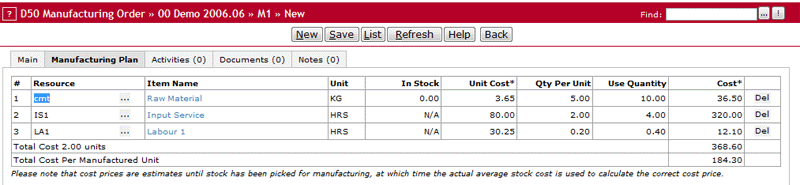
Balancing Input Labour It is important to understand the reason for accrual of labour expense and how to offset the Accrued Labour account. Accrued labour is used to monitor the cost of labour for an assembled item. This labour cost is part of the cost of goods sold for the assembled item when the assembled item is sold. At the same time, the labour expenses for the assembled order are also expensed as salary when running payroll. Hence, unless salary is offset with the accrued labour expense, the assembly wages will be expensed twice, because it will be part of both salary expense and cost of goods sold on the assembled item. Therefore, when running payroll the salary account needs to be credited by the value of accrued labour. This reduces the salary expense by the equivalent of the assembly wages part of the cost of goods sold of the assembled item. Example of a Assembly and Inventory Below a assembly order and how it affects inventory is displayed in screen shots. The following image displays the assembly plan for this item, including one raw material, one input service and one input labour item.
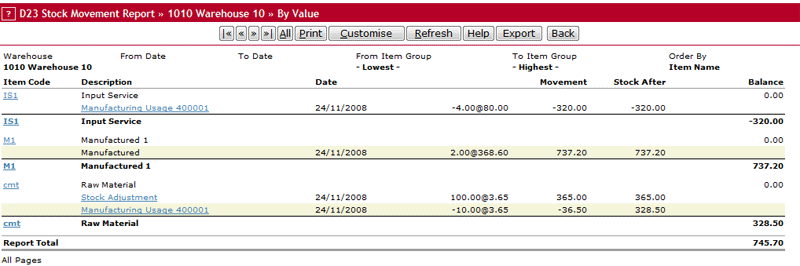
Stock and Input Services MovementAfter the order is completed the following stock movements and input services have been captured. The stock adjustment entry is not related to the assembly order itself. It should be noted that when the input service is purchased, which normally happens before the assembly order and net addition of 4 units will captured on the movement of input services. Which means that after the assembly is completed, this will have a balance of 0.
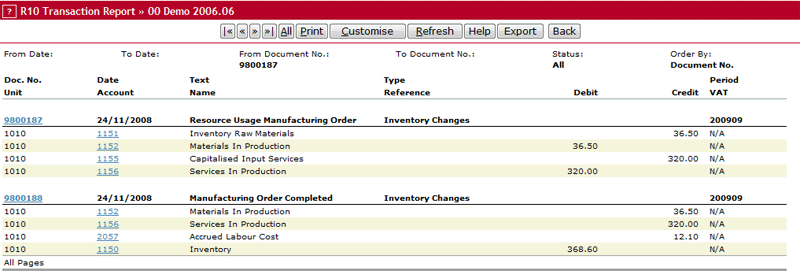
Financial Inventory Transactions Direct AccrualAfter the order is completed the following two transactions have been captured. The first transaction is captured for stage In Production, the second for stage Completed.
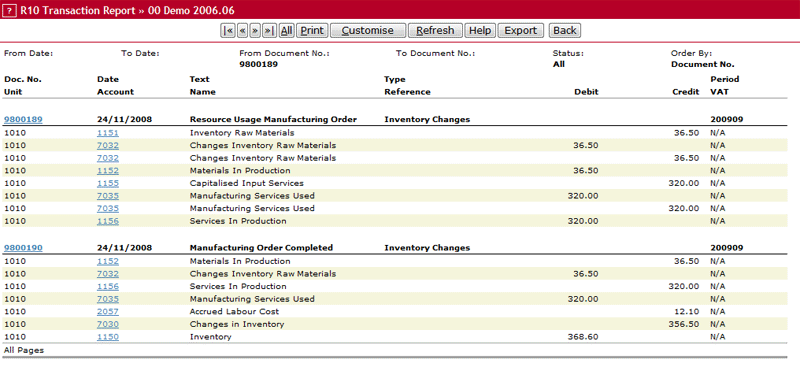
Financial Inventory Transactions No Accrual or Accrual w/Inventory ChangesProcessing the same assembly order using a different method from Direct Accrual will give the following two transactions after the order has been completed. The first transaction is captured for stage In Production, the second for stage Completed.
Balancing Accrued LabourIn this example R 6.05 of the cost of each assembled item is labour wages. When one unit of the assembled item is sold, R 6.05 is expensed for assembly wages as part of cost of goods sold. On payroll, lets say the person doing the assembly is paid R 5 000. Keeping in mind that this person assembled this item, R 6.05 of his salary is also part of the cost of goods sold for one unit of the assembled item. Therefore to get correct total expenses, salary needs to be credited with R 6.05 for each unit this person assembled (in this case two units totalling R 12.10) |