| Title | Anchor ID | Element Type |
|---|
 |
Financials DashboardYour financials dashboard provides you with instant information about how your business is doing.
Cash and LiquidityThe cash and liquidity SmartPanel displays key information about the company's current cash position and provides key indicators for working capital and liquidity. Furthermore, it also lists the current balance for all bank accounts.

Liquidity AnalysisWorking capital management is concerned with making sure we have exactly the right amount of money and lines of credit available to the business at all times. The liquidity ratios are an important part of working capital management. Cash is the life-blood of any business, no matter how large or small. If a business has no cash and no way of getting any cash, it will have to close down. It's that simple! Following on from this we can see that if a business has no idea of its liquidity and working capital position, it could be in serious trouble. Working CapitalWORKING CAPITAL is current assets minus current liabilities; also called net current assets or current capital. Calculation
|
CURRENT RATIO (or Working Capital Ratio), a comparison of current assets to current liabilities, is a commonly used measure of short-run solvency, i.e., the immediate ability of a firm to pay its current debts as they come due. Current Ratio is particularly important to a company thinking of borrowing money or getting credit from their suppliers. Potential creditors use this ratio to measure a company's liquidity or ability to pay off short-term debts. Though acceptable ratios may vary from industry to industry below 1.00 is not atypical for high quality companies with easy access to capital markets to finance unexpected cash requirements. Smaller companies, however, should have higher current ratios to meet unexpected cash requirements. The rule of thumb Current Ratio for small companies is 2:1, indicating the need for a level of safety in the ability to cover unforeseen cash needs from current assets. Current Ratio is best compared to the industry.
| Current Ratio = |
Current Assets
Current Liabilities
|
QUICK RATIO (or Acid Test Ratio) is a more rigorous test than the Working Capital Ratio of short-run solvency, the current ability of a firm to pay its current debts as they come due. This ratio considers only cash, marketable securities (cash equivalents) and accounts receivable because they are considered to be the most liquid forms of current assets. A Quick Ratio less than 1.0 implies "dependency" on inventory and other current assets to liquidate short-term debt.
| Quick Ratio = |
(Current Assets - Stock)
Current Liabilities
|
CASH RATIO is a refinement to the QUICK RATIO. It is the ratio of cash and marketable securities to current liabilities. The CASH RATIO indicates the extent to which liabilities could be liquidated immediately. Sometimes called LIQUIDITY RATIO.
Please note that in SMARTEDGE only cash and bank is used to calculate the Cash Ratio, since there is no dedicated account group for other marketable securities.
| Cash Ratio = |
(Cash and Bank)
Current Liabilities
|
Two graphs are displayed showing daily cash balances and Receivables, Payables and Inventory respectively.

This graph shows the cash balances and overdrafts available for individual days the last year. To display the exact amount for any given day move the mouse along the graph lines. The amount and date is displayed in the top right-hand corner of the graph and a dot indicates the day.
Please note that by default the graph displays available overdrafts. Available overdrafts is equal to overdraft limit less actual overdraft on that day. Please note that the overdraft limit needs to be set on all credit card and bank overdrafts accounts.
To display the actual overdrafts instead of available overdraft, tick the checkbox Actual overdraft situated just above the graph.
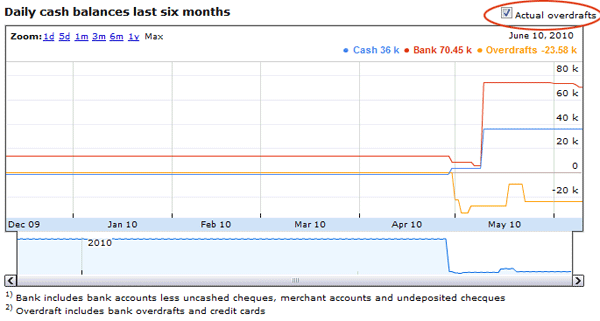
The graph can be zoomed by either clicking one of the zoom buttons in the top left-hand corner of the graph or drag the zoom range below the graph. Below this is illustrated.
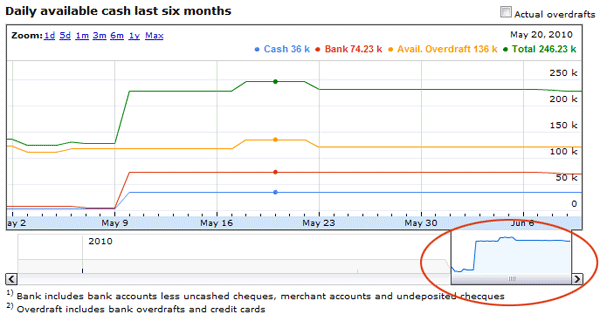
The Cash and Liquidity SmartPanel lists all bank accounts with the current balance. The last date indicates the last transaction date captured on the account.
The profitability SmartPanel displays key information about your income, expenses and operating profitability.
This tells you the operating income and expenses excluding interest of the business so far this month. It also displays this month's operating profit.
This tells you the operating income and expenses exluding interest of the business so far in the current financial year. It also displays the operating profit.
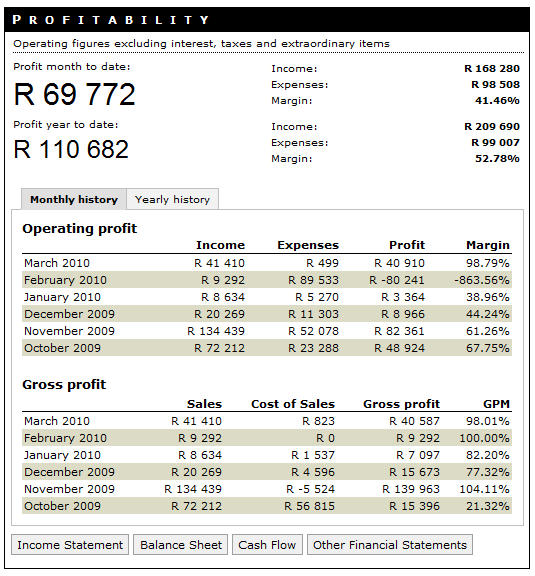
Operating margin is calculated from operating income and operating expenses exluding interest. The figures are before tax and any extraordinary items. Income is the sum of transactions on accounts belonging to account groups Sales Revenues, Other Operating Income and Other Financial Income. Expenses is the sum of transactions on accounts belonging to account groups Cost of Sales, Personnel Expenses, Other Operating Expenses, Write-Offs and Other Financial Expenses.
| (Operating) Margin = |
(Income - Expenses) * 100
Income
|
Gross profit margin is calculated from sales income and cost of sales expenses. The figures are before tax and any extraordinary items. Sales income is the sum of transactions on accounts belonging to account groups Sales Revenues. Cost of Sales is the sum of transactions on accounts belonging to account groups Cost of Sales.
| (Operating) Margin = |
(Sales - Cost of Sales) * 100
Sales
|
